My Main Blog Can Always Be Found Here

Monday, February 28, 2011

Monday Mugs: Whatever I Want


How could I not participate in this week's Monday Mug's Theme, it is Whatever I want

But with no constraints it suddenly almost seemed hard, so I went to my last picture folder and picked two of my favorite pictures.

My two boys and I am so glad my big boy is willing to hop in a picture for me, unlike his little sister

he even asked me to take a picture of him like thisThanks Lucas, for making this picture taking mommy happy!

Head over to Oswald Cuties for more great pictures!

Wednesday, February 23, 2011

Fix It For Me Wednesday: Lots of Looks

This week's picture came from my good from Em (Emily-awesome awesome name) of Emilisq. She has been one of my long time blogging friends. She sent me this adorable picture of her daughter that her friend actually took. Today, rather than go through a step by step-I want to show you how drastically a picture can change and how with simple presets available for Lightroom can change the look of a picture with one click.

Whenever I am going to be trying lots of different looks to a picture, I always "fix" the picture first. Fix the exposure, sharpen the eyes, get rid of any blemishes (which there weren't any on this baby), do any cropping. Basic things that I know I will want to be fixed no matter what look I give the picture.

In this picture, besides the eye sharpening, etc, I extended the blanket in the upper left hand corner, I increased the exposure a lot and also decreased the red saturation quite a bit to get that creamy white skin that is popular on babies in pictures currently.

And then I just started to have a little fun


1- Preset: Summer Love (by Pretty presets)
2- Preset: Old Hoga B&W
3- Preset: Kiss & Tell
4- Preset: B&W Bliss and Black Border (by Pretty Presets)
5- Preset: Mocha And the Preset Vignette

Before I applied any of these presets, I went back to my fixed picture and started from there. In a lot of ways I think #3 is my favorite-the coloring just really seems to work for me with the whole look of the picture. Obviously I would not want to give this look to an entire session, but for a single picture here and there it is awesome.

Which is your favorite?

Monday, February 21, 2011

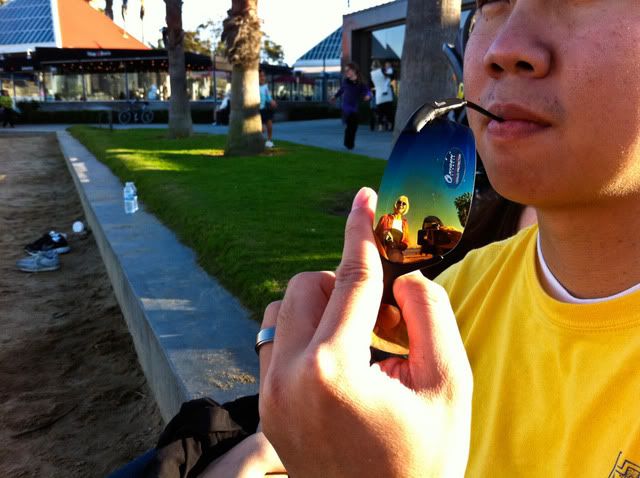
iHeart Faces: Cell Phone


This week's iHeartfaces theme is cell phone. This week the picture has to have a human face in it and be taken with a cell phone.

I love this picture of my brother-in-law, not only was it taken with my iPhone, but you can see me taking the picture in the reflection (and my mom too). This shot is just straight out of camera-or phone in this case.
Linking up with Monday Mugs too


Head over to iHeartfaces for more great cell phone pictures.

Thursday, February 17, 2011

You Capture: Warm

Well last week was cold and this week it's warm...and no I am not talking the weather but I am talking about the theme for You Capture this week.
Photobucket

Nothing quite says warm like palm trees and sunshine
And swinging outside
with bare feet
Head over to I Should be Folding Laundry for more warm pictures.

Wednesday, February 16, 2011

Fix It For Me Wednesday: Good to Amazing

This week's picture came from the wonderful host of Monday Mugs... and I just realized I don't know if she ever uses her real name on her blog-so the nameless beauty of Oswald Cuties :)

She is a very good photographer who is getting better all of the time because she is always getting out there and shooting.

This tutorial will show how when you have a very good picture to start off with, how easy it is to make it outstanding.

She took the following picture of her daughter and loved it and asked if I could give it that little extra something.
And then after just a few fixes
So how did I get to my fix?

She had a bit of a rash on her face and a runny nose, so I first used the retouch brush in iPhoto. Most programs have a retouch brush that you just click over the area you want fixed, so easy.

Then I took the picture into light room and the following is all I did.

1- Increase black clipping (sliding bar by the word black) +6
I did this as the little triangle on the left side of the histogram was not lit up and so I increased the black a little

2- Increased the brightness +61

3- Used a brush-Wow Eyes Sharpen and did one quick swipe over each eye

4- Used the Brightness brush, increased the size of the brush and swept it once over the left side of her face as it was a little too shadowy

5- Used Preset- Semi Fix the Flat

6- Increased the Vibrancy

7- Decreased the red saturation to -27

So 7 steps may sound like a lot-but it took me at most 4 minutes, probably less to make this fix.

Obviously, the less time you can spend fixing a picture the better off you are. So when you start with a great picture it is so much easier.

And she actually sent me a couple of pictures asking if I could fix one or both, and since the fix was so easy and fast, here is the second picture I did just for fun.


Have a picture you would like me to fix?
Send me a picture at photo (at) emmymom2 (dot) com

Just be advised I have about three more pictures waiting, so it will be about one month until your edit is done.

Monday, February 14, 2011

Monday Mugs

This week's Monday Mug's is over on my main blog, you can find it here.

See you Wednesday for my next Fix it For Me Picture.

Thursday, February 10, 2011

You Capture: Cold

When I saw the You Capture topic for this week- "cold" I thought, huh? It is in the mid 70's here, this one might be tricky.

But then I woke up the next morning to this
yes that is real frost on the grass-it does get chilly in the morning

And Alex-well she was complaining she was cold

And nothing says cold like a long sleeve flannel shirtand yes he was really wearing this-it was only in upper 50's this day-brrr!

Don't hate!

Grab your blankets, some hot chocolate and head over to I Should Be Folding Laundry to see more cold pictures.
Photobucket

And head over to my main blog for an interesting thought about the biggest number and the national debt.